
How to clear Filter value in Primefaces Datatable?

As we Know, primefaces provides plenty of components for JSF. In this discussion, we are going to uncover filter attribute mystery in Datatable.


Above the pic represents the filter option which is available in primeface. we can easily inherit filter option to datatable.
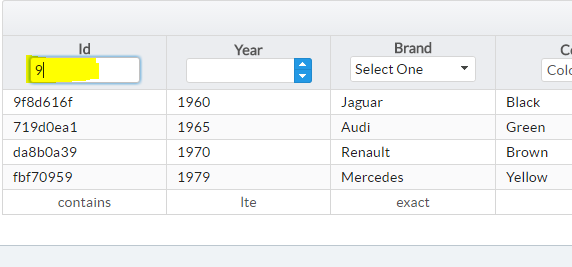

PROBLEM WE FACE:

while doing filter in datatable primeface, if we want to go further action.
for example, you have 1000 of records, you're filtering option to filter those records. while filtering, you have seen your records and you need to go another action, at the time filter wont be clear. it will be remains same.
Inorder to overcome that issue, we need to use below scripts,

RequestContext.getCurrentInstance().execute("PF('any_name').clearFilters()");

Add widgetwar attribute in your datatable component

<p:datatable id="d_id"  widgetVar="any_name">

Popular posts from this blog

CONVERTING TORRENT FILE TO ZIP FILE

HOW TO CONVERT TORRENT FILE TO ZIP FILE 1>>click the link below  http://www.zbigz.com   2>>upload your .torrent file  3>>wait until conversion, after conversion your  file can be downloadable in .zip format.

What is the difference between Abstraction and Encapsulation?

I'm sure You came here to see the answer after vising plenty of websites and which is not enough to understand about that concept. The reason why you cant get the perfect or believable answer abut this concept is you're not reading the whole content slowly and carefully. But im sure if you read this fully and carefully, you can earn the knowledge about the difference between Abstraction and Encapsulation. and here we are gonna teach you the real time scenario of Abstraction and Encapsulation. ok!  Lets go to the Topic. What is Abstraction: "Abstraction  is a process of hiding the implementation details and showing only functionality to the user." You could see this answer in many websites. Let me explain about what is implementation and functionality.  For Example, " Dhoni is a cool captain" Cool is his nature it is his Function. He is always cool even the Team is in underpressure. So cool is his Natural Function. And, We dont know how he is so cool in under...

Simple Trick To Convert A Webpage To PDF File

Simple Trick To Convert A Webpage To PDF File In this post i will teach a simple trick or browser feature that let you convert any web page into PDF file format, which might help you to read your favorite articles offline. So lets get start. How To Save Web Page To PDF File ? Step 1: Open the Google Chrome Browser on your PC or MAC  Step 2: Then go to the web page that you want to convert as a PDF.  Step 3: Now press Ctrl+P on Windows pc or Command+P if you are on a Mac to Open the the Print dialog on Chrome Browser.  Step 4: Now Change the destination to “Save As PDF” and hit the save button. Step 5: The current web page will instantly be downloaded as a PDF document.